Shodan promotes itself as a search engine that lets you see which computing devices on your network are directly accessible from the Internet. That's a bit of a stretch, but it is, nonetheless, a useful security checkup. Technically, it reports on open TCP/IP ports in your router and offers some information about the software behind those ports. In the most secure case, there would be no open ports.
Open TCP/IP ports are analogous to unlocked doors. They normally come from two sources. In a router or a gateway (combination modem/router) provided by an ISP, ports may be opened because the ISP uses them as a backdoor into your home network. This is one reason that I suggest using your own hardware whenever possible. The other common source of open ports is UPnP, a software protocol supported on all routers. To understand UPnP, let's back up.
All the computing devices in a home share one public IP address (shown below) and it is assigned to the router. All the computers, tablets, phones, IoT devices, etc. also have private IP addresses that are normally not visible to the outside world. The private IP addresses are how devices in a home can talk to each other and to the router. A very common private IP address is 192.168.1.1. A router that supports UPnP can be told to make a device in your home directly accessible from the Internet. In effect, it punches a hole in the firewall provided by the router. Hello bad guys. Consumer routers always come with UPnP enabled. Business or professional routers come with UPnP disabled.
Initially, this page only generated a Shodan query of your public IP address (your router). Now, it also queries many other services that look for both malware and open TCP/IP ports. If your router has been doing bad things, hopefully one of the queried websites will detect it.
QUALIFICATIONS: To test your router, you need to view/load this page without an active VPN or Tor connection. If you are connected to a VPN, then the public IP address that appears in the generated queries below (and the name shown below) is that of the VPN server rather than your router. This, of course, is by design. Likewise, if you are using Tor, the IP address and name below are from the Tor exit node.
MORE WARNINGS: For most of us, our public IP address changes over time. Thus, the IP address shown below could have belonged to someone else yesterday. Also, the services being queried to not check every IP address every day, so the reports will always be a bit dated. Even if you have had the same IP address for months, the report may have been generated before your router was infected with malware.
How the world sees your router
Your public IP address is: 3.129.63.186
The public name of your router: ec2-3-129-63-186.us-east-2.compute.amazonaws.com
Your router has a public name that typically does not matter because you normally do not directly address your router when away from home. Oftentimes, the public name includes the public IP address. Sometimes it is the public IP address (VPN providers like to do this). Sometimes, it identifies the ISP. Nerds often refer to the name as a "host name". Another technical term is "Reverse DNS".
Many ISPs assign names that include their name. For example, some Spectrum customers have public names that end in rr.com because in the old days Time Warner called their Internet service Road Runner. Comcast names in the U.S. often end with XX.comcast.net where XX is a two letter abbreviation for the state where the router is located.
Queries of your public IP address
Click the link below to see what Shodan knows about your public IP address. As explained below (in the Notes About Shodan section), a Not Found response is not an error, it just means that Shodan has not examined your public IP address. This opens in a new browser window/tab.
Your Customized Shodan Query: www.shodan.io/host/3.129.63.186
Click the link below to see what Censys.io knows about your public IP address. It opens in a new browser window/tab. The best response is "no publicly accessible services".
Your Customized Censys Query: www.censys.io/ipv4/3.129.63.186
Click the link below to see what urlscan.io knows about your public IP address. It opens in a new browser window/tab. The best result is "Not observed on urlscan.io". If you use a VPN, this may confirm that the server is owned by the VPN provider.
Your Customized urlscan query: urlscan.io/ip/3.129.63.186
Click the link below to see what Virus Total knows about your public IP address. It opens in a new browser window/tab.
Your Customized VirusTotal query: www.virustotal.com/#/ip-address/3.129.63.186
Click the link below to see what Security Trails knows about your public IP address. It opens in a new browser window/tab.
Your Customized SecurityTrails query: securitytrails.com/list/ip/3.129.63.186
Click the link below to see if any websites are hosted on your public IP address. "Something Went Wrong" means there are none, which is usually what you hope to see. It opens in a new browser window/tab.
Your Customized URLVoid query: www.urlvoid.com/ip/3.129.63.186
Click the link below to see what GreyNoise knows about your public IP address. It opens in a new browser window/tab.
Your Customized GreyNoise Query: viz.greynoise.io/ip/3.129.63.186
Click the link below to see information about the ISP assigned to your public IP address. It opens in a new browser window/tab. Note that if you are connected to a VPN, it is not going to show the VPN provider name.
Whois info from Domain Tools: whois.domaintools.com/3.129.63.186
Click the link below to see what SANS knows about your public IP address. It opens in a new browser window/tab.
SANS IP info: isc.sans.edu/ipinfo/3.129.63.186
The Mullvad Connection check page tests if your public IP address is blacklisted. If you are having emails disappear, this could be why.
If you have a Cisco router, then click the link below. It tests an information disclosure bug from Jan. 2019. More details are on the Bugs page. Not seeing details about your router is a good result. It opens in a new browser window/tab.
Your Customized Cisco router query: http://3.129.63.186/cgi-in/config.exp:8007
Notes About These Queries
Both queries are keyed off your public IP address. If you load this page from a device connected to a VPN, then the public IP address is that of a VPN server, not your router. Hiding the public IP address of your router is a core function of a VPN. With that in mind, you could use this page as a poor man's VPN tester. You better, see a different public IP address with the VPN connected and disconnected.
Likewise, if this page is loaded from a computer connected to the TOR network, the public IP address will be that of the TOR exit node and not the router.
With billions of computers on the Internet, neither Shodan nor Censys can query each one every day. There is a chance the reports of your current public IP address may be for someone else's router. This can happen because your current public IP address may not have been your IP address yesterday or last week when it was scanned by Shodan. It is not yet clear to me if Censys is reporting real time information or not.
Most consumer Internet connections have dynamic (i.e. variable) IP addresses. When the IP address changes, is totally up to your Internet Service Provider. Most of the time, you could care less about your public IP address. But, for Shodan and Censys testing, it matters. They may have last checked the IP address you are currently assigned, a week or two ago. In Shodan, look for the "Last Update" field on the left side. Censys does not indicate when their data was collected. At the time these search engines last checked your current IP address, it may have been assigned to someone else. Thus, this could all be a waste of time.
Notes About Shodan
The format of the Shodan Last Update timestamp can be confusing. In the example below
2017-03-08T03:21:44.262872
The date is March 8, 2017, not August 3, 2017. Everything after the T is a timestamp.

Finally, Shodan does not query every IP address. You may well get a Not Found error as shown at the right. That's fine. Note that the
error message is wrong. What is not found, is an IP address, not a website.
About Shodan Reports
The goal, for most people, with a Shodan Report is to have NO open TCP/IP ports. You are most secure with all ports closed. One reason that every article about router security says to disable Remote Administration, is that it opens a port.
The big upside to Shodan is that it can show ports that were opened by IoT devices using the miserably insecure UPnP and NAT-PMP protocols. It also shows ports that are open as backdoor into the router for an Internet Service Provider. There are two examples of this below. While I am no fan of consumer routers, at least they don't come with ISP backdoors built into them. Shodan also shows some information about the open port(s) and its report is a bit more approachable for non-techies.
A downside to Shodan is that it does not show anything about closed ports that it tested. Ports are not simply open or closed, they can be Open, Closed or Stealthed. For that level of detail, there are many other websites that report on TCP/IP ports listed on the Test Your Router page.
Sample Shodan Reports
To see a sample Shodan Report, two reliable IP addresses are those of OpenDNS (208.67.222.222) and Google DNS (8.8.8.8). Each server has a single open port, 53, for DNS.
One port you do not want to find open is 7547. It is often left open on devices given out by an ISP so that they can remotely access the box. Technically, this port is used by a remote management protocol known as both TR-069 and CWMP. Many times this has been abused by bad guys to hack the router. In April 2017 it was reported that Shodan found over 41 million devices with port 7547 open.
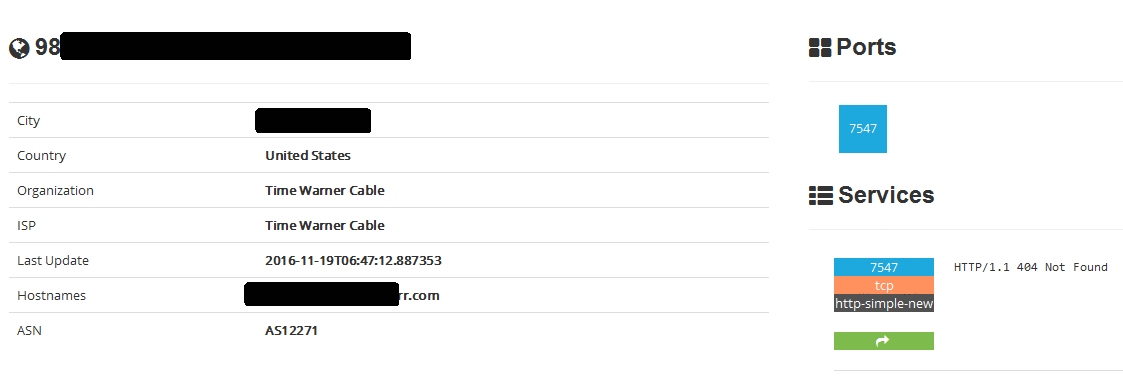
Another port you do not want to find open is 4567. It seems that both CenturyLink and Verizon (and probably other ISPs) use this as a back door into the router. See here, here, here and here.

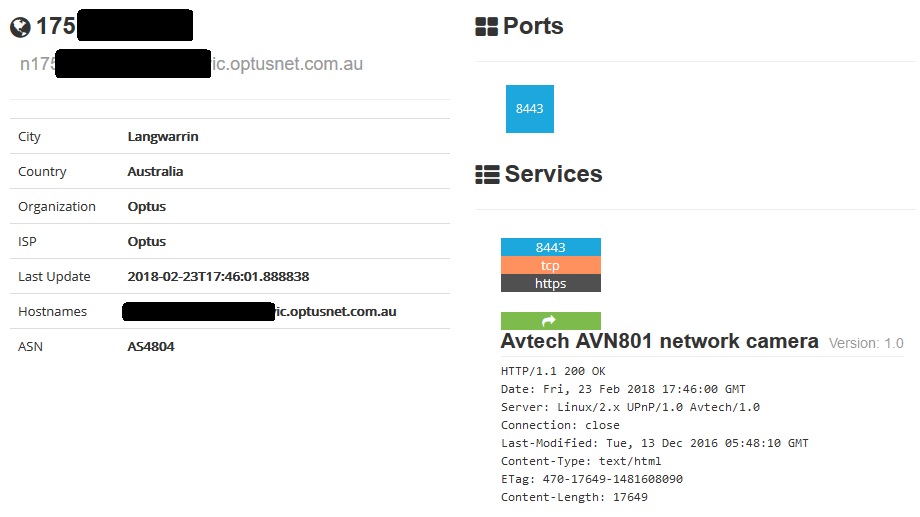
Most press coverage of Shodan focuses on finding specific vulnerable devices, rather than reporting on a home router. The example below is thus a more typical usage of Shodan. From analyzing the response to queries on port 8443, Shodan was able to learn that the thing it found was an Avtech AVN801 network camera.
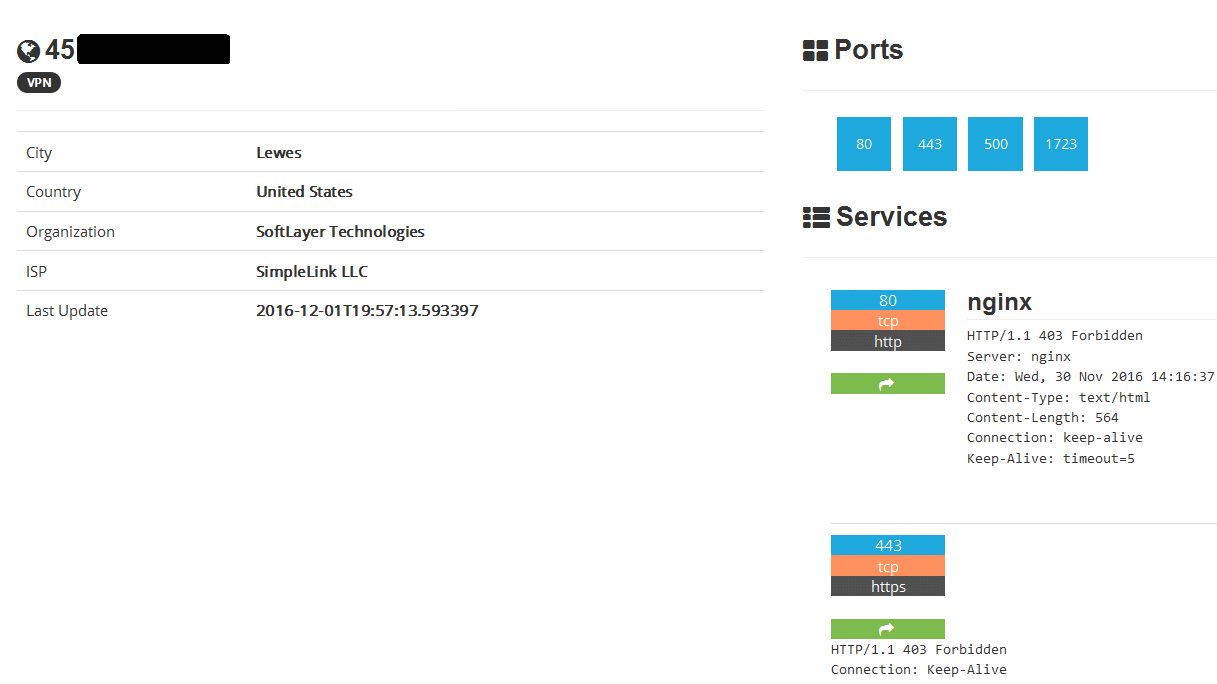
An interesting report, shown below, is from a VPN server. It has four open ports, 80, 443, 500 and 1723. The last two are for the VPN. Port 443 is for secure HTTPS web pages. Port 80 is for insecure HTTP web pages, a strange thing to see on a VPN server.
If you run across any interesting Shodan reports, send me the screen shot.